
Every marketplace reshapes your photo. None of them ask first.
Facebook Marketplace shows listing photos as squares in the browse grid. A normal 4:3 photo from a phone loses a quarter of its width there, and what disappears is usually the nose or the tail of the car. AutoTrader does the opposite and pads anything narrower than 4:3 with grey bars. Most dealers find this out after the listing is live.
This extension shows you the crop before you upload, and lets you pick which part of the photo survives it.
Free, no account, nothing leaves your browser.
See the crop before you upload.
These are screenshots from the current Listing Photo Check extension. They show the tool itself rather than a mock-up, so you can see what you get before installing it.
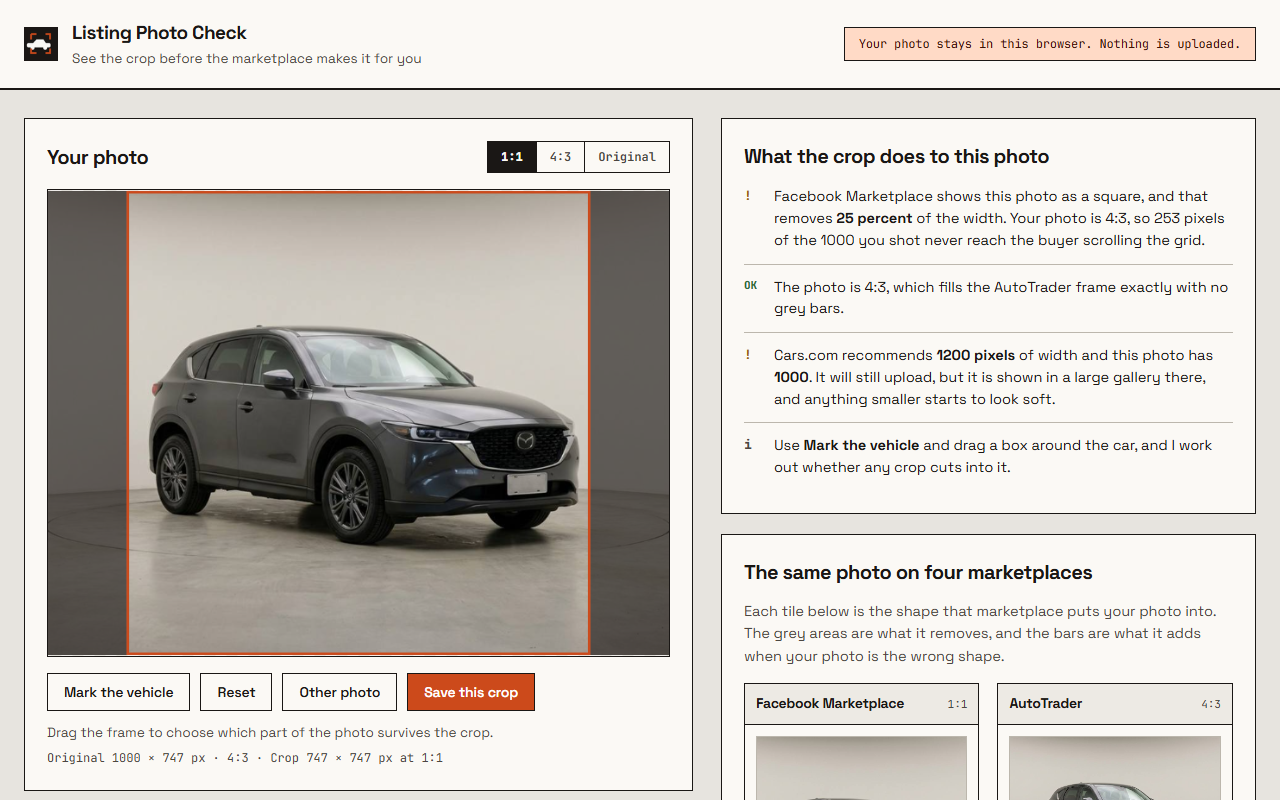
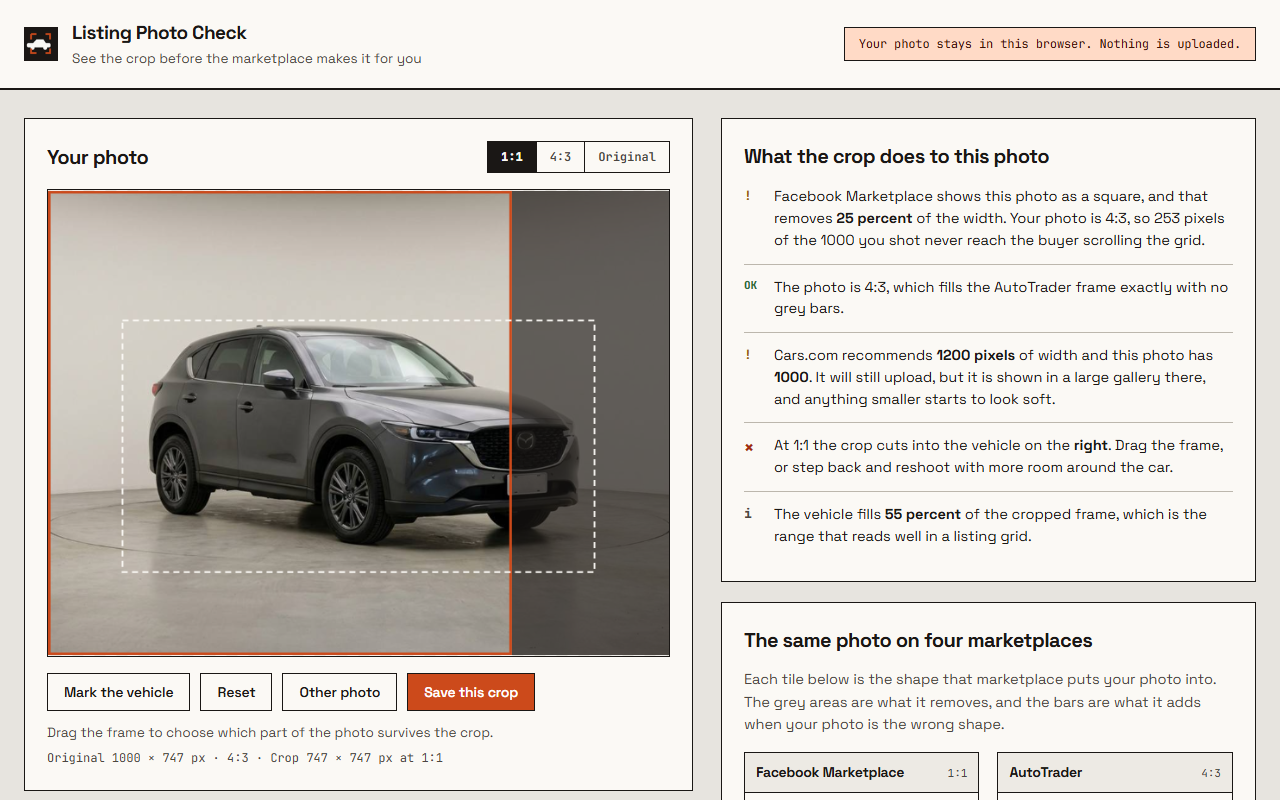
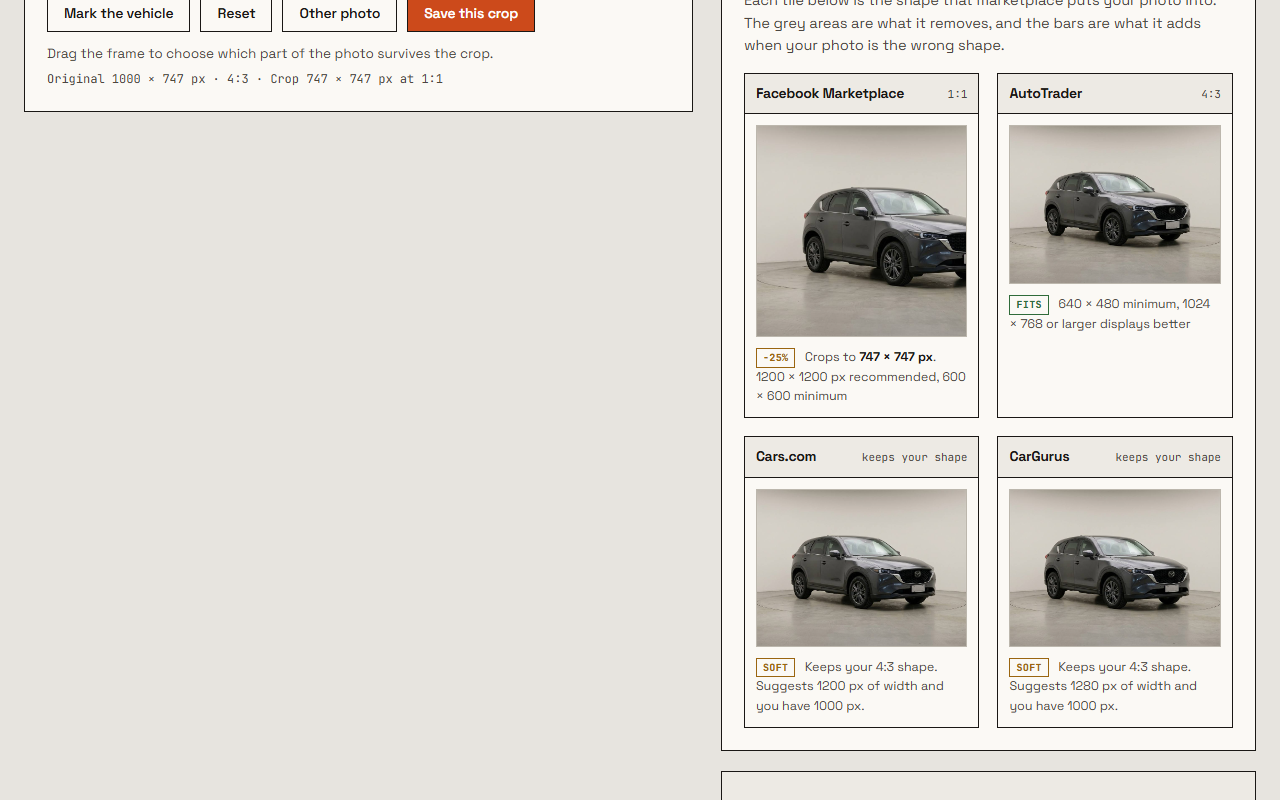
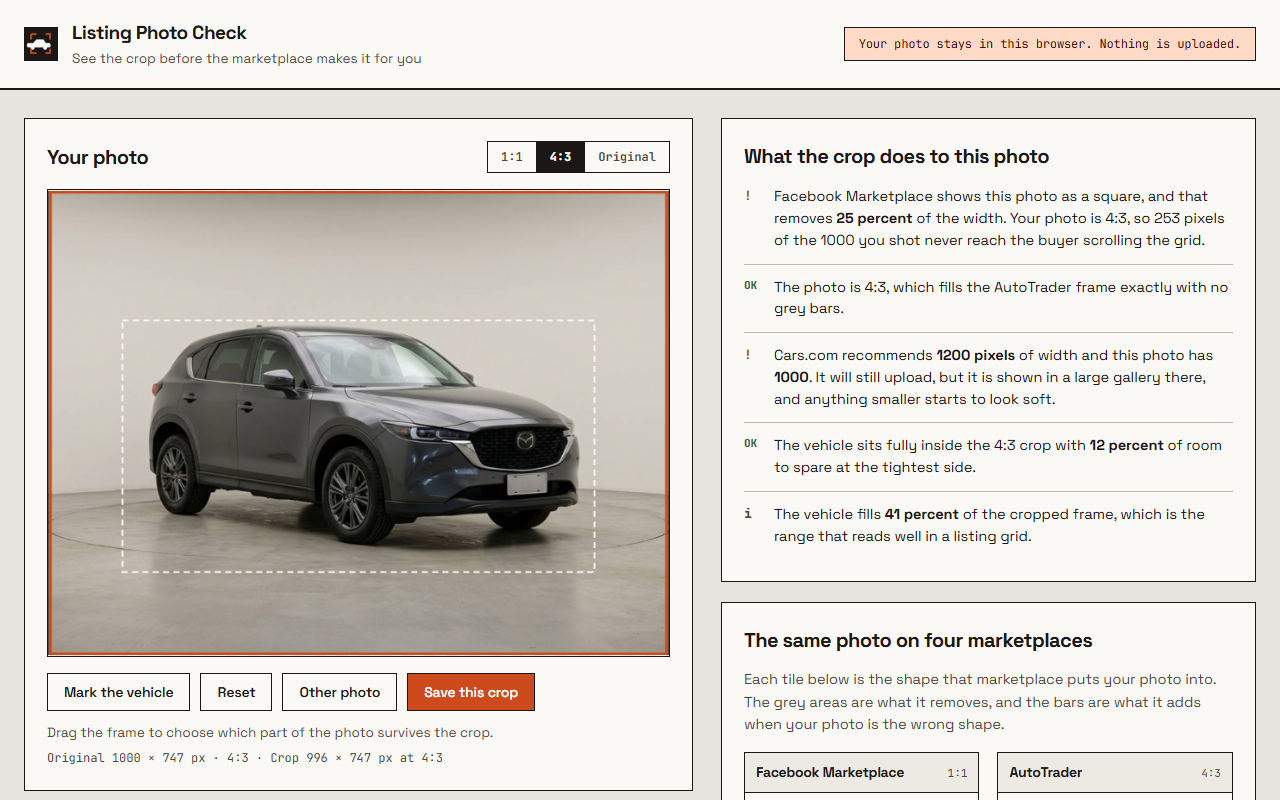
What it tells you about a photo
Drop a vehicle photo into the extension, or right-click one that is already open in your browser. It reads the file where it sits and works out five things.
How much the square crop removes
Stated in percent and in pixels, against the actual dimensions of your file. A 4:3 photo loses 25 percent of its width to the Facebook grid, a 3:2 photo loses 33 percent, and a 16:9 photo loses 44 percent. Those are the same numbers every time, but almost nobody knows which one applies to the camera they are holding.
Whether the car survives the crop
Draw a box around the vehicle and the extension says whether any crop cuts into it, on which side, and how much room is left at the tightest edge. Below roughly four percent of margin it warns you, because marketplaces trim a few more pixels on some devices than the specification promises.
How much of the frame the car fills
A vehicle that fills under 35 percent of the cropped frame reads as a small car in a grid of larger ones, and buyers scroll past it. Above 92 percent the bumpers sit on the edge, which reads as rushed. The range in between is where a listing photo looks considered.
Whether the resolution matches each marketplace
Cars.com shows photos in a large gallery and asks for 1200 pixels of width, and a square crop out of a small photo can drop below the Facebook minimum without the width ever looking wrong. The extension checks the crop, not just the original, because the crop is what gets uploaded.
The requirements it measures against
These are the reference values currently configured in the extension. Platform guidance and interfaces can change, so treat them as a pre-upload check rather than a guarantee of acceptance. Where a marketplace does not publish a hard numeric threshold, the extension labels its own practical assumption — for example, the 1280-pixel CarGurus HD threshold below is our interpretation, not a published CarGurus number.
| Marketplace | Shape | Resolution | What happens to a mismatch |
|---|---|---|---|
| Facebook Marketplace | 1:1 in the grid | 1200 × 1200 recommended, 600 × 600 minimum | The sides are cropped away in search and browse. The full photo survives only inside the listing itself. |
| AutoTrader | 4:3 landscape | 640 × 480 minimum, 1024 × 768 or larger displays better | Anything narrower gets grey bars left and right rather than a crop. |
| Cars.com | keeps your shape | 1200 px of width recommended | The extension flags lower-width files because large listing galleries can make limited resolution more visible; this is a quality check, not a promise about acceptance. |
| CarGurus | keeps your shape | HD quality expected, read as 1280 px or more | No hard 1280-pixel minimum is asserted here; the extension uses it as a practical HD-quality threshold. |
The practical consequence is that one photo cannot be right everywhere at once. A 4:3 original fills the AutoTrader frame exactly and loses a quarter of itself on Facebook. Shooting with room around the vehicle is the only thing that survives both, which is why the extension measures margin rather than just telling you a number.
Where your photos go: nowhere.
There is no server behind this extension. Photos are read by the browser, measured by the browser, and forgotten when you close the tab. No account, no sign-in, no analytics, and no copy of your inventory anywhere.
It asks for no host permissions at all, which means it cannot watch you browse. The one thing it can read is the single image you right-click, at the moment you right-click it.
The four permissions, in plain terms
- contextMenus
- Adds one entry to the right-click menu on images.
- activeTab
- Lets it read the one image you right-clicked, on that tab, at that moment.
- scripting
- Reads that image with the page's own login, so photos behind a dealer portal work too.
- storage
- Hands that one image to the extension's own tab. Cleared when the browser closes.
Questions dealers ask
Does it edit or improve my photos?
No. It crops and it measures, and that is the whole scope. It does not remove backgrounds, adjust colour or add a logo, because a listing photo that has been quietly altered is a problem on several marketplaces rather than an advantage.
Do I need an AI Car Video account?
No, and there is nowhere to make one from inside the extension. It works on its own for anyone listing vehicles, whether or not they ever order a video from us.
Can I use it on photos behind a dealer login?
Yes. Right-clicking an image reads it with the credentials of the page it sits on, so inventory tools and portal back ends work. If a page refuses the read, the extension says so and asks you to drop the file in instead.
Which crop should I actually upload?
Upload the shape each marketplace wants, which usually means two files rather than one. If you only have time for one, keep the 4:3 original for AutoTrader and Cars.com, and cut a separate square for Facebook, because that is where the crop costs you the most.
Once the photo is right, the video is the next step.
A correctly framed photo makes a listing easier to scan. If you also want motion, we can turn the same source photos into a short vehicle video; the first sample is free.
Something not working, or a marketplace we should add? Write to hello@aicarvideo.com and it reaches the person who built it.